[ Article ]
What a startup website needs at launch
The pages and homepage sections a new startup actually needs, what to leave for later, and templates built that way.

The short version
A startup website at launch needs to do three things: say what the product does in one line, show that it works and give people one clear next step. That fits on a homepage and three or four other pages.
Here’s what goes on each one, what to leave for later, and a few of my Framer templates that are built this way.
The pages you need at launch
Home: the one page most visitors will see. Most of the work goes here.
Pricing: even if it’s “talk to us”. People look for it before they sign up.
About: who you are and why you’re building this. Early customers are betting on the team.
Contact or demo: one form, short.
Privacy and terms: needed the moment you collect an email address.
A blog and a changelog are worth adding once you have something to put in them. An empty blog looks worse than none.
The homepage, section by section
Hero: a headline that says what it does, one line under it on who it’s for, and one main button.
The product: a real screen or a short loop of it working. It beats any abstract illustration.
How it works: three or four steps or features, each with a picture.
Proof: logos, numbers, a quote from a user. Whatever you honestly have.
Pricing or a pricing teaser.
An FAQ: the objections you hear on sales calls, answered.
The same button again, at the bottom.
Say what it does, plainly
The headline is the hardest line on the site. It has to work for someone who has never heard of you and gives the page three seconds.

Kestrel Suite, a free template of mine, leads with “Inbox zero, before lunch.” It’s a promise a reader can picture, and the product screen right under it backs it up.
Show the product working
The fastest way to make a new product believable is to show it doing the job. A real interface, real-looking data and a little motion beat any amount of description.
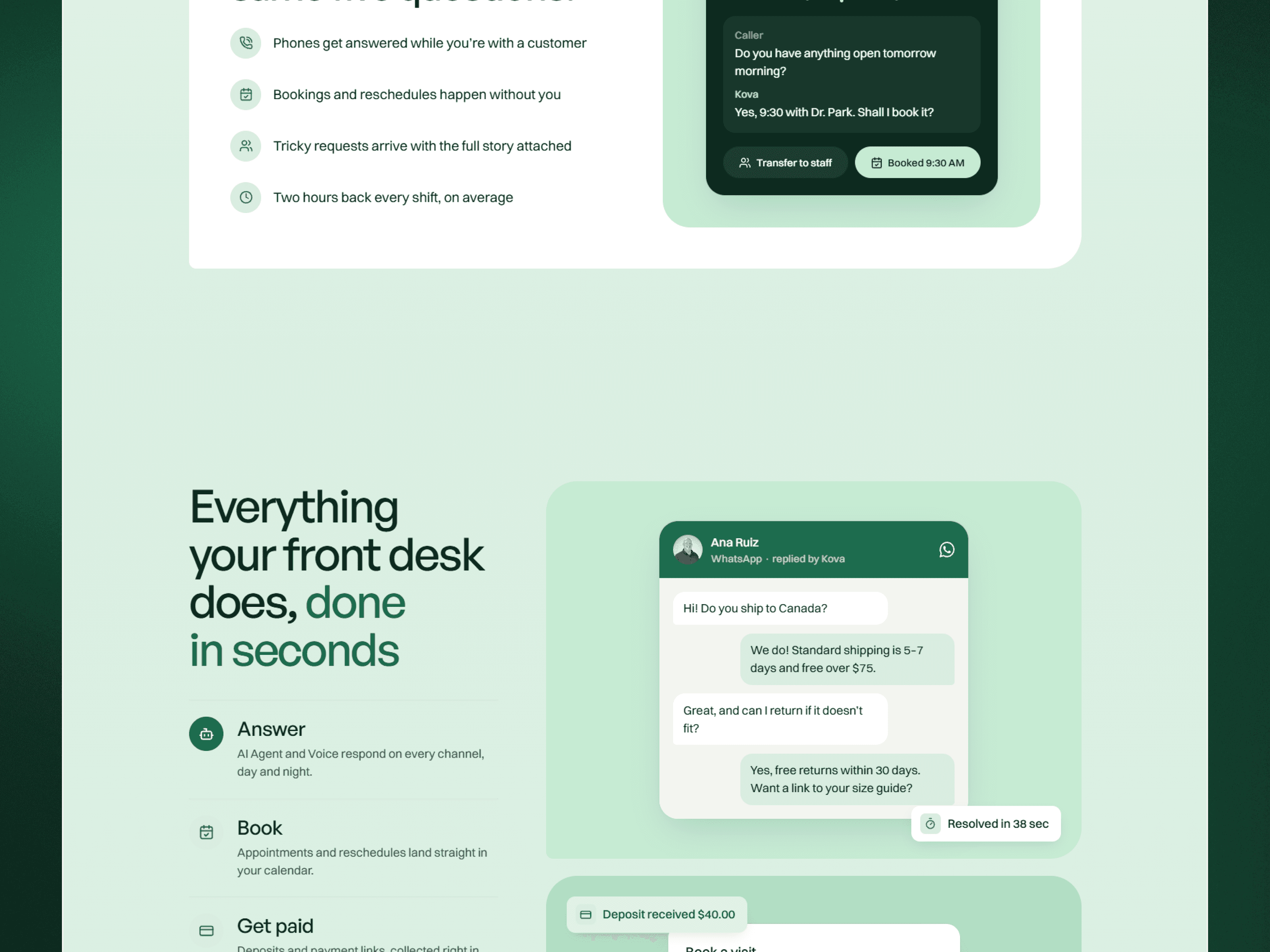
In Kova Agent, inbox rows, chat messages and voice waveforms build themselves as you scroll, so visitors watch the product answer a customer before they read a feature list.
If a visitor can’t say what you do after the first screen, nothing below it matters.
Use the proof you actually have
Before launch you may not have logos or reviews. Use what’s true: a waitlist number, a pilot customer, a quote from a beta user, a result from your own testing. Never make it up. Early visitors are usually the people best placed to notice.
Make pricing easy to find
Even a simple plan card answers the question people are too polite to ask on a demo call. Two or three plans, what each one includes and who it’s for.

For an app, the main button might be a download instead. Dewpoint, my fintech app template, opens with a phone showing a live balance that ticks up every second, and puts the App Store and Google Play buttons right under the headline.
What to leave for later
A page for every feature. One good homepage section each is enough.
Careers, until you’re hiring.
A docs site, unless developers are your users.
Translations, until you know where your users are.
Built for change
A launch site will change every week for the first few months: a new headline, a new plan, a new customer quote. Build it somewhere you can edit yourself, with the parts that change often in a CMS.
That’s the main reason I build startup sites in Framer. Founders can change the copy, add a blog post or swap a screenshot without waiting on a developer. I compare it with the main alternative in Framer vs Webflow.
Templates built this way

Opero, $49: for software built for AI agents, with a proof block under every claim.
Roundtable Multi, $49: an isometric world built from native layers, with seat-picker pricing and an FAQ written as a chat.
Cirro, free: an AI startup in a soft 3D sky, with a demo for each user role.
Kernal, free: dark and developer-focused, with live ASCII art and a terminal hero.
Kestrel Suite and Kova Agent, free: for multi-product SaaS and AI support.
Two of them, Opero and Cirro, are on my work page.
How much does a startup website cost?
From $0 for a free template you set up yourself, to $1,499 for a custom landing page with me. Hosting on Framer is $10 to $30 a month. There’s a full breakdown in how much a website costs in 2026.
How long does it take?
A template set up for you is live in three to five days. A custom landing page takes me about two weeks.
Should a startup use a template?
For the first version, often yes. You’ll learn what your visitors read and where they drop off. Go custom once you know what the site needs to say.
Do I need a blog at launch?
No. Add one when you have a few posts ready, and keep a changelog once you’re shipping regularly.
If you’re about to launch, start a project and I’ll design and build the site around your product.
Some links to Framer on this page are referral links. If you sign up through one, I may earn a commission, at no extra cost to you.

Written by Gwatsin
Designer and developer
[ Next article ]
Framer vs WordPress: design, upkeep and cost →

exquisite