[ Article ]
Framer vs Wix: which builder fits your site
Where Wix is stronger, where Framer is, what each costs, and how to move between them.

The short answer
Pick Wix if you want an app for everything inside one account: bookings, events, a restaurant menu, a shop and email marketing. Pick Framer if you want the site to look designed, move well and stay simple to run.
I build in Framer, so I’m not neutral. I’ll tell you where Wix is the better choice anyway.
At a glance
Free plan: both have one. Wix’s shows Wix branding on a wixsite address. Framer’s publishes to a framer.website address.
Cheapest plan with your own domain: Framer Basic at $10 a month. Wix Light at about $17 a month billed yearly, with a free domain for the first year.
Selling online: Wix, from its Core plan at about $29 a month billed yearly. Framer needs a connected store or checkout.
Built-in extras: Wix, by a long way. Its app market covers bookings, events, restaurants and more.
Design and motion: Framer. Layout, type and scroll effects are where it’s strongest.
Keeping it tidy: Framer. Shared styles keep every page consistent, and there are fewer widgets to bolt on.
How they feel to build in
Both let you drag things around a page, which surprises people who think of Wix as a block builder. The difference is what happens next.
Wix is built to add things: a new section, an app, a widget. It’s easy to keep adding until the page gets busy. Framer is built like a design tool. You work with frames, stacks and styles, set the layout for desktop, tablet and phone, and the site stays consistent because every page shares the same styles.

Clinics and studios are a big part of Wix’s audience. Luneform is my Framer template for med spas and longevity clinics, with prices on the treatment menu and a booking form that works from day one.
What they cost
Framer: free on a framer.website address. Basic is $10 a month with your own domain and two CMS collections. Pro is $30 a month with ten collections, redirects and staging.
Wix: free with Wix branding. Paid plans billed yearly are about $17 for Light, $29 for Core, $39 for Business and $159 for Business Elite a month in the US. Every paid plan includes a free domain for the first year. Light has no ecommerce. Core is the first plan that can sell.
For a simple site, Framer is cheaper. For a shop, Wix Core can work out cheaper than Framer plus a separate store. The Framer pricing guide has the full detail on Framer’s plans.
Wix gives you more tools. Framer gives you a better-looking site.
Selling online
Wix wins on convenience here. Products, checkout and payments live in the same account as the site.
On Framer, you connect a store. It can still feel like one site to the shopper.
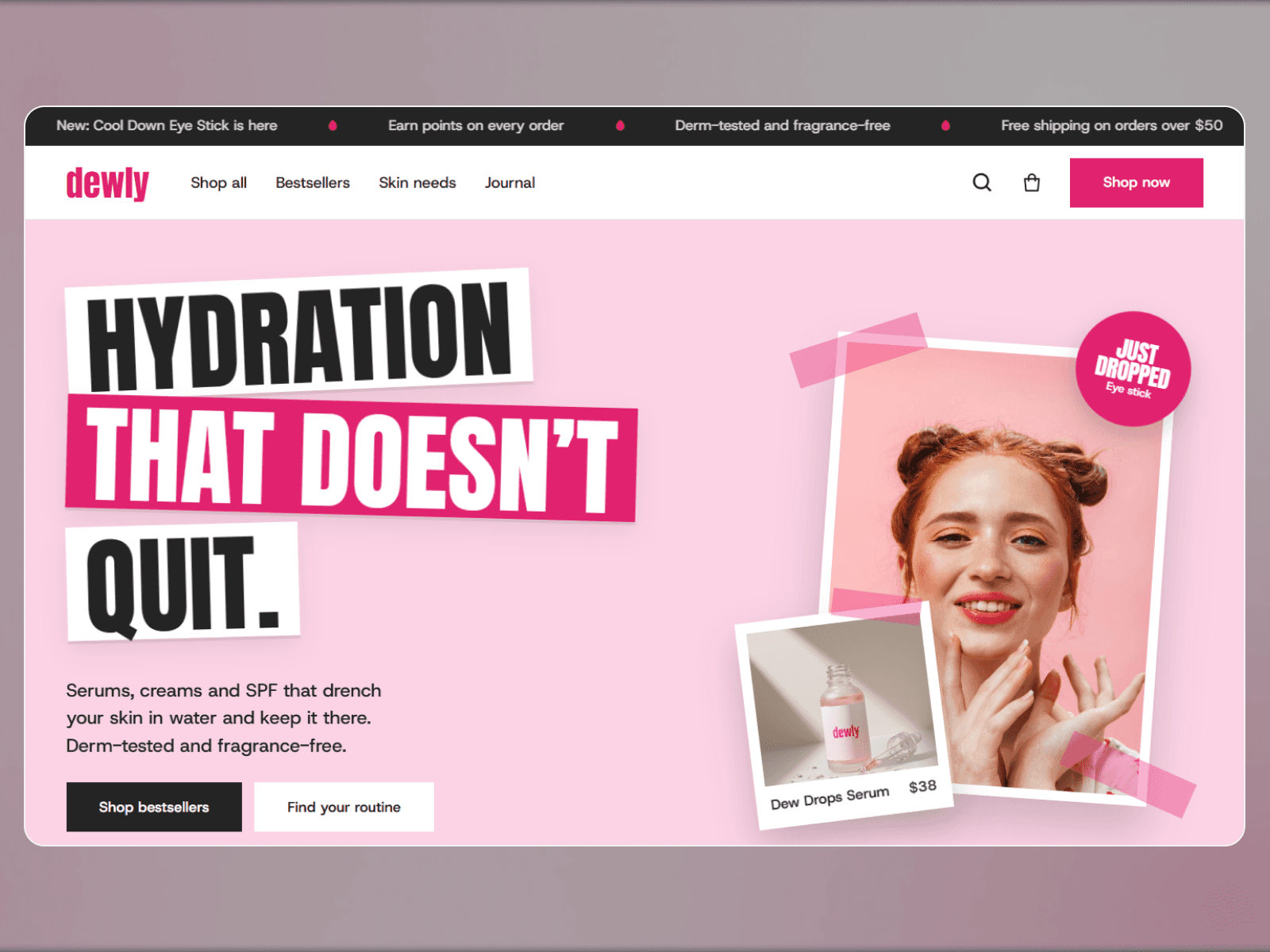
Dewly, my skincare template, has a slide-out bag with quantities and a subtotal, a free shipping progress bar and a Shopify checkout for the whole bag. It can also link to Stripe, Lemon Squeezy or Gumroad instead.
Bookings and events
If your business runs on appointments, classes or ticketed events, Wix’s built-in apps save you from stitching tools together. On Framer, you link or embed the booking or ticketing tool you already use.

Halflight Fest, my free festival template, lays out ticket tiers, and each button can point to your ticket checkout. The design lives in Framer, and the selling happens wherever you sell tickets.
SEO
Both give you page titles, descriptions, alt text and a sitemap. Both can rank. The page that answers the question best is the one that wins, whichever builder made it.
When I’d pick each
Wix: a restaurant, a class studio, an events business or a small shop that wants every tool in one login.
Framer: a service business, a portfolio, a startup or a product launch, where looking good is what brings the enquiry in.
Moving from Wix to Framer
List your pages and URLs, and note which get traffic.
Copy out your content: text, images and blog posts. Wix has no one-click export to Framer, so plan time for this.
Rebuild the design in Framer, or start from a template close to it.
Replace the Wix apps you rely on with a booking, store or form tool that works with Framer.
Set up redirects from the old URLs on Framer Pro.
Move the domain and test forms, bookings and checkout the same day.
Is Framer better than Wix?
For design, motion and a site that stays tidy, yes. For built-in bookings, events and selling, Wix does more out of the box.
Is Framer cheaper than Wix?
For a site without a shop, yes. Framer Basic is $10 a month and Wix Light is about $17 billed yearly.
Can I sell on a Framer site?
Yes, by connecting Shopify or a checkout like Stripe, Lemon Squeezy or Polar. Framer doesn’t handle payments on its own.
Is Wix good for SEO?
It’s fine for most small sites. Like any builder, what you publish matters more than the platform.
Thinking of moving off Wix? Start a project and I’ll handle the rebuild, or browse my templates first.
Some links to Framer on this page are referral links. If you sign up through one, I may earn a commission, at no extra cost to you.

Written by Gwatsin
Designer and developer
[ Next article ]
Framer portfolio templates for designers, photographers and writers →

exquisite